How should you approach fan obstacles in Keep It Up!?
Identify the Keep It Up! fan chamber from official screenshots and plan balloon handoffs without inventing fan timing, airflow strength or room solutions.
How do you recognize the fan scene?
Look for ceiling-mounted fan units over the route. The official screenshot below shows several units, platforms and a balloon near the players. These visible details help identify the scene; they do not reveal a complete route or a timing cycle.
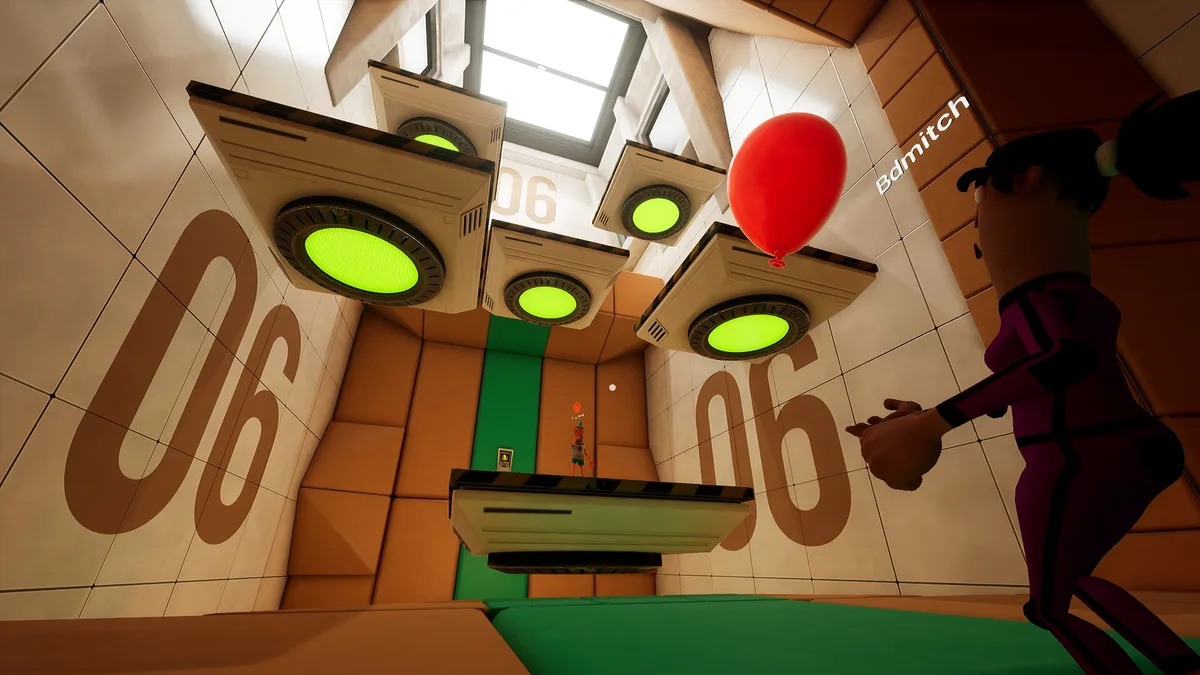
Open the interactive scene reference to inspect the marked details.
What should you observe before moving?
First check the current build. Does the fan run continuously or change state? Where is the balloon moving relative to your next position? Can another player keep it in view while you inspect the route?
Those are observation questions, not claims that the game necessarily uses cycling fans or a particular airflow model. A still screenshot cannot establish strength, direction, safe distance or timing.
What is a useful co-op plan?
Keep the balloon caller and the route caller separate for the first attempt. Identify a next position, agree who handles the handoff, then reassess after a touch. Avoid treating the pictured green platforms as independently tested safe checkpoints.
Reveal the planning reminder
Watch the balloon’s actual response before planning around airflow. If everyone loses sight of it while moving, pause the route call and restore a clear handoff.
Is there a proven fan-room shortcut here?
No exact shortcut, wind timer or launch angle has been verified for this page. Use balloon rules for the confirmed objective and spikes and lasers for other hazards. The first-run guide explains the preparation sequence.
What is the evidence?
The official Steam description and screenshots, checked 22 October 2026. The scene title is a descriptive label used by this wiki, not a confirmed level name.
Related Articles
guides
How do you download the Keep It Up! demo?
Download the Keep It Up! demo from Steam and check the announced Q4 2026 release window. Learn why the 15-room promise is not a demo room count.
guides
How do you play Keep It Up!? A first-run guide
Learn the Keep It Up! balloon objective, how a run can fail, what to check before playing, and a simple plan for your first co-op attempt.
guides
How many players can play Keep It Up! together?
Keep It Up! supports up to four players in online co-op. Check solo support, in-game voice chat and the limits of currently confirmed multiplayer details.
Was this helpful?
Thanks for the feedback!